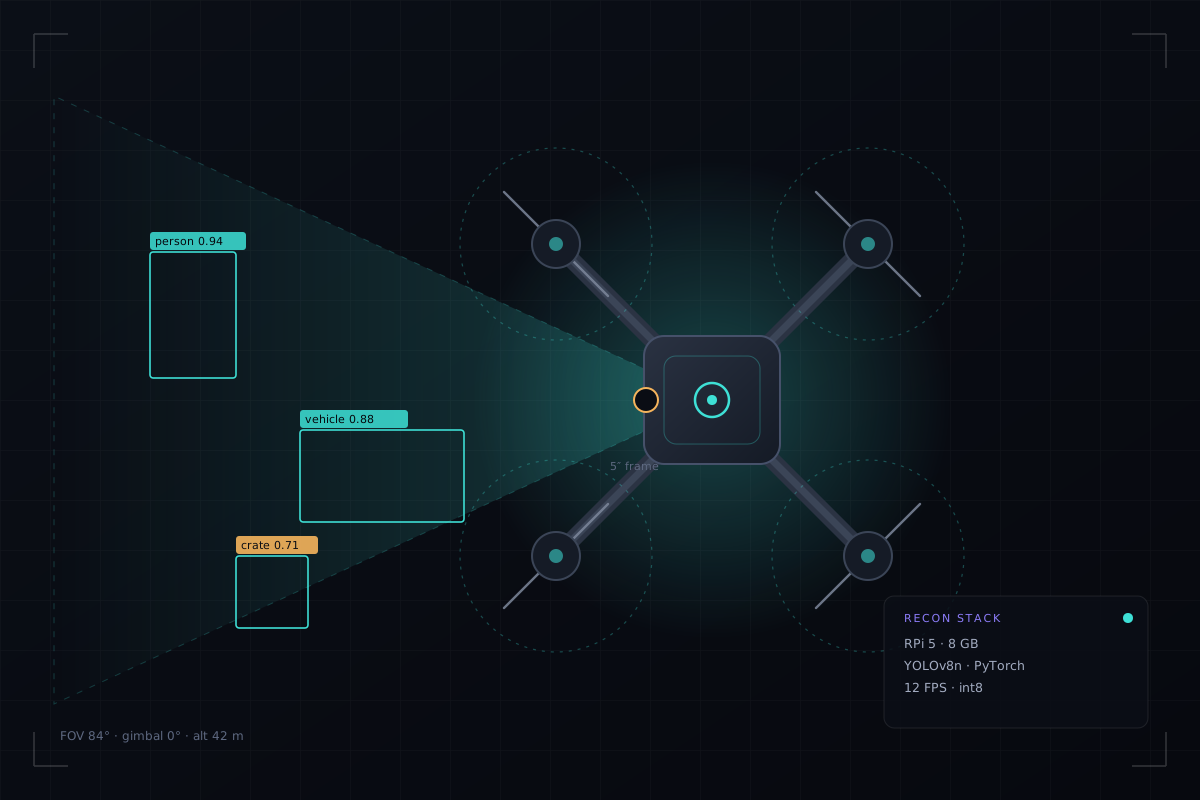
This guide assumes you have never built a quad and want one that flies, then thinks. It is written in build order, not theory order: nothing appears before you need it, and every step names the mistake it is there to prevent.
Credit where it is due. The airframe half follows the method the FPV community has converged on — Oscar Liang's build logs for wiring and assembly order, Joshua Bardwell's Betaflight walkthroughs for setup and troubleshooting, Painless360 for anything ArduPilot. Those are the sources I learned from and the ones to watch if you prefer video. What I have added is the part they do not cover: making the aircraft autonomous, and running a detector on board.
Two builds in one. Parts A–B give you a normal 5-inch FPV quad that flies on a radio. Parts C–D turn it into a reconnaissance platform. You can stop after Part B and have a working drone — that is the right milestone, and skipping it is how projects end with a pile of parts and a GitHub repo.
The decision that shapes every purchase
Betaflight or ArduPilot? It is not a preference, it decides whether the project is possible. Betaflight is a superb manual-flight firmware with no meaningful autonomous mission layer. ArduPilot gives you GUIDED mode, position hold, mission upload and a MAVLink API — exactly what a companion computer needs.
If your goal is racing or cinematic flying: Betaflight, stop reading at Part B. If your goal is "the drone finds things and tells me where", you need ArduPilot, and you should choose a flight controller with enough UARTs on day one.
| Goal | Firmware | Extra hardware |
|---|---|---|
| Manual FPV, filming | Betaflight 4.x | VTX + FPV camera or digital air unit |
| Autonomous survey + detection | ArduPilot Copter 4.6+ | GPS + compass, Pi 5, telemetry link |
| Both | ArduPilot (it flies fine manually) | GPS, Pi 5, RC link |
Tools, and the three that are not optional
A LiPo is a fire, held politely. Never charge unattended, never puncture one, never solder with a pack connected. A 6S 1500 mAh pack delivers well over 100 A into a dead short — the smoke stopper exists so that mistake costs €10 instead of your build.
A1 · Frame assembly
Lay every part on the bench and count it against the manual before you touch a screw. Frames ship with different arm thickness and standoff length, and the manual is the only thing that tells you which screw goes where.
Bottom plate first
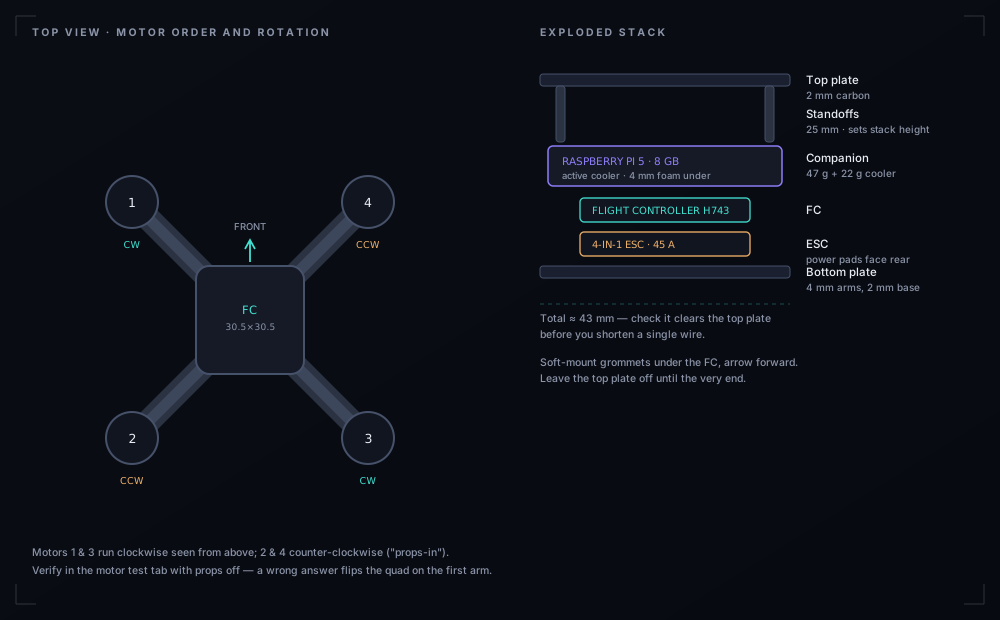
Attach the four arms with two screws each, threadlocked, and torque evenly. On most 5-inch frames the arms are sandwiched between plates — do not fully tighten until all four are in.
Rotation direction matters more than position
Standard "props-in": motors 1 and 3 spin clockwise seen from above, 2 and 4 counter-clockwise. You set this in firmware later; getting it wrong here only costs a propeller.
Standoffs
25 mm is common for a stack that has to carry an FC, an ESC and a Pi 5 on top. Measure your tallest board plus connectors before you commit.
Camera plates and top plate last
Leave the top plate off until the end. You will re-open this frame at least twice.
A2 · Motors, and the screw that kills them
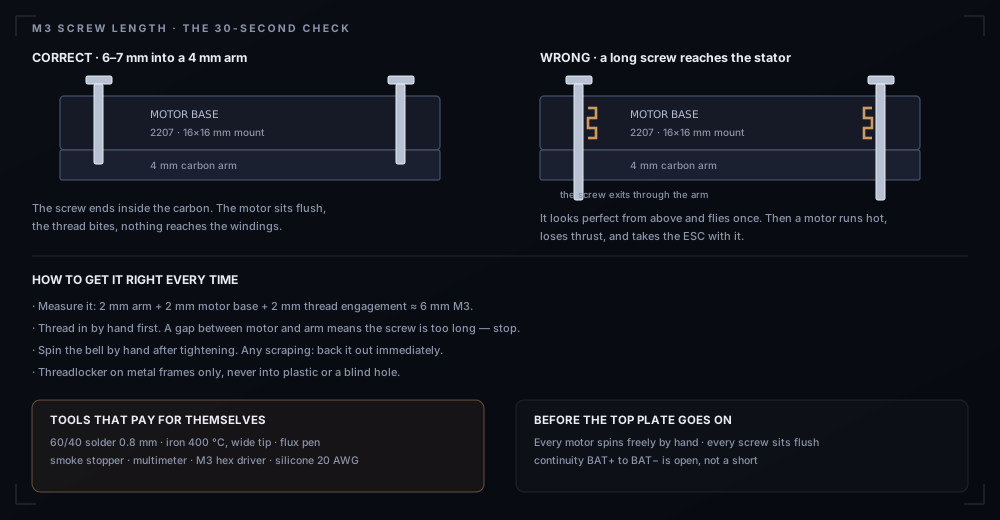
The most common way to destroy a motor is a screw 2 mm too long. It threads through the arm, through the motor base, into the stator winding — where it looks perfect and works for one flight.
Mount all four motors to the arms before the arms go on the frame
Far easier to reach the screws. I know this from doing it the other way.
Hand-thread, then torque
Start every screw by hand. If it binds, stop — you are cross-threading or too long. Spin the bell by hand after the last screw; any scraping means back it out now.
No props yet
Props go on after the firmware test, and not one minute before.
A3 · Power train and pads
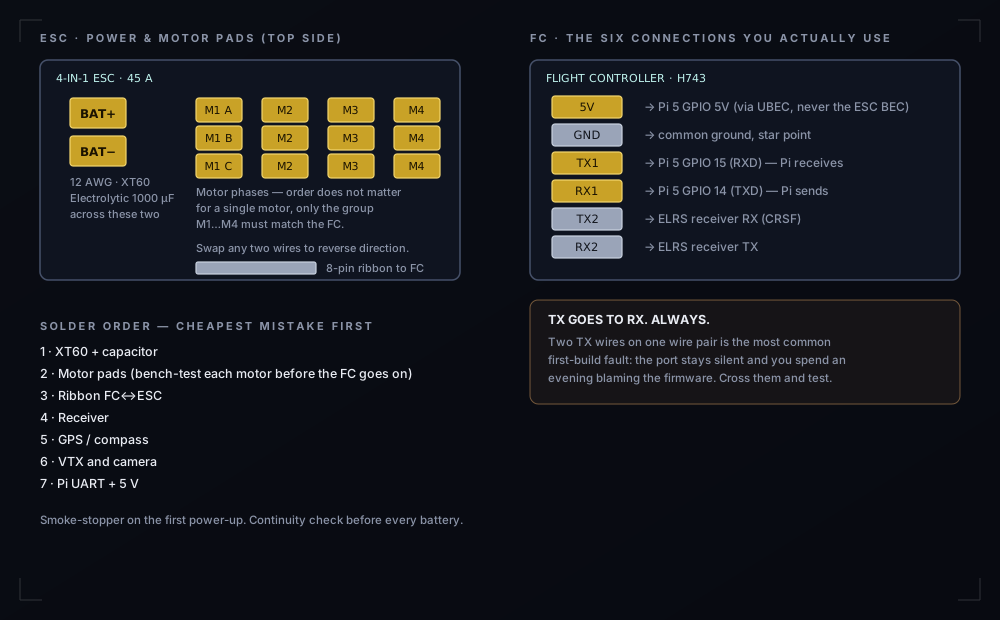
Solder in the order below. Each step is testable before the next, which is the whole point: you want the cheapest possible failure.
XT60 + capacitor
Tin the pads, then the wire, then join with a wide tip at 400 °C. Keep the capacitor legs short and solder it across BAT+ and BAT− — it absorbs the switching spike that otherwise reaches your video and your Pi.
Continuity check before anything else is connected
Multimeter in continuity mode between BAT+ and BAT−: it must be open. A beep means a short, and you have just saved an ESC.
Motor phase pads
Three wires per motor, order irrelevant for a single motor — swapping any two reverses its direction. What matters is that the M1…M4 groups match the FC's outputs.
First power-up with the smoke stopper
No props, no FC connected. If the stopper trips, stop and find the short. If it passes, you have a live power stage and a working ESC.
The brownout that ends projects: the Pi 5 wants 5 V at up to 5 A and is unforgiving about sag. The ESC's built-in 5 V BEC collapses the moment motors spool. Use a dedicated 5 V/5 A UBEC fed from the battery, and prove it: spin the motors up on the bench while watching vcgencmd measure_volts. Below ~4.85 V, fix it before you fly.
A4 · Mounting the stack
Soft mounts under the FC
Silicone grommets on a 30.5×30.5 mm pattern. They isolate the gyro from frame resonance — without them your PID loop fights vibration it cannot see.
Arrow forward
Every FC has an orientation arrow. Mount it forward and believe it. If the board is physically rotated, fix that in software later — do not compensate mentally, you will forget.
Ribbon FC ↔ ESC
Plug-in on most stacks. Check the pinout orientation twice; reversing it is a dead FC.
Leave room above for the Pi
Roughly 45 mm of stack height for FC + ESC + Pi 5 + active cooler. Plan cable exits now, not after everything is bolted down.
A5 · Receiver, GPS, video
- ELRS receiver — solder to a free UART, bind it before you hide it under a plate. Binding after assembly is a hobby in itself.
- GPS + compass — on a mast, as far from the VTX and the Pi as the frame allows. Compass interference is the number one cause of "toilet-bowling" in position hold. Calibrate outdoors, away from metal and magnets.
- VTX — power from a filtered 5 V/9 V rail, never from the Pi. Antenna connected before power-up, every single time.
- Camera — for the AI build, skip the analog camera entirely and mount the Pi Camera Module 3 on a damped plate. Two cameras is weight you do not need.
B1 · The flashing sequence
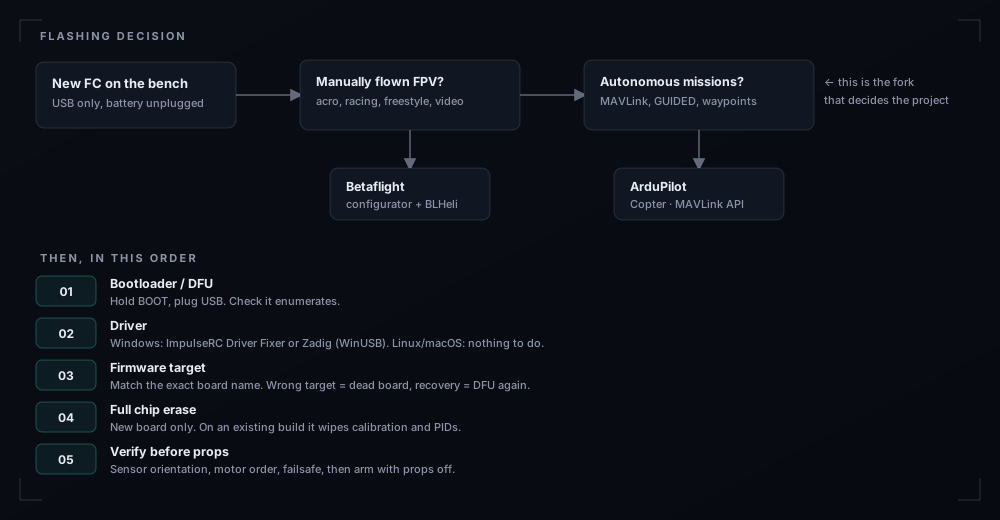
B2 · Betaflight path (manual flight)
Enter DFU / bootloader mode
Hold the BOOT button while plugging in USB, or bridge the boot pads. The board appears as an STM32 device, not as a serial port. Battery disconnected throughout.
Install the driver (Windows only)
ImpulseRC Driver Fixer is the one-click route; Zadig with WinUSB is the manual one. Linux and macOS need nothing. If the configurator says "no serial port", this is why 90 % of the time.
Flash the exact target
In Betaflight Configurator, pick the board name printed on your FC — not a similar one. Full chip erase on a new board; never on an existing build unless you want to redo calibration and PIDs.
Ports and receiver
Enable Serial RX on the UART your ELRS receiver uses, then set Receiver Mode to Serial and provider to CRSF in the Receiver tab.
Motor direction
BLHeli Configurator or the Motors tab: verify each motor spins the direction your props expect. Reverse in software, not by resoldering unless you must.
Failsafe and modes
Set a switch for arm, a switch for beeper, and a failsafe stage 2 that drops the quad rather than flies away. Test by switching the radio off on the bench, props off.
B3 · ArduPilot path (autonomy)
This is the path this build uses: ArduPilot exposes MAVLink, which is what the Pi speaks.
Flash the .apj for your board
Easiest: Mission Planner or QGroundControl installs the firmware over USB in one click. Manual route: download the .apj from firmware.ardupilot.org for the exact board, then flash with STM32CubeProgrammer in DFU mode.
Frame class and motor order
Choose Quad X and follow the motor-test order exactly. This is the step where a wrong answer flips the aircraft on the first arm.
Serial port for MAVLink
Set the UART wired to the Pi as MAVLink2 at 57600 baud. Note the number — the Pi is configured with the same port and baud.
GPS, compass, battery
Compass calibration outdoors, battery monitor with correct cell count and capacity, low-voltage failsafe enabled. Do not disable pre-arm checks to "make it fly" — each one is telling you something.
Failsafe: RC loss → RTL
Three seconds, return to launch, then land. Test it on the bench by powering the radio off.
Enable GUIDED on a switch
You want a hardware way back to manual at any moment. This is the most important safety feature on an autonomous aircraft.
# ArduPilot parameters worth setting explicitly (read them back — names move between versions)
PARAM_SET FRAME_CLASS      1     # 1 = Quad
PARAM_SET FRAME_TYPE       1     # 1 = X
PARAM_SET SERIAL2_PROTOCOL 2     # 2 = MAVLink2  (UART wired to the Pi)
PARAM_SET SERIAL2_BAUD     57    # 57600
PARAM_SET ARMING_CHECK     1     # 1 = all checks on. Never 0.
B4 · Prove it before it leaves the bench
Bench gate — skip no line. Sensors level in the HUD when the frame sits flat · motor order correct in the test tab, props off · every motor spins freely by hand · failsafe triggers when the radio is switched off · GPS lock ≥ 10 satellites outdoors · compass offsets sane · battery voltage within 0.2 V of a multimeter.
C1 · Power
Separate UBEC, separate ground, 5 A available. The Pi 5 will brown out under motor acceleration otherwise, and a brownout mid-flight looks exactly like a software crash.
# Watch the rail while you punch the throttle on the bench
watch -n 0.2 'vcgencmd measure_volts; vcgencmd measure_temp; vcgencmd get_throttled'
# 0x0 = clean. Anything else = undervoltage or thermal throttling. Fix before flight.
C2 · UART to the flight controller
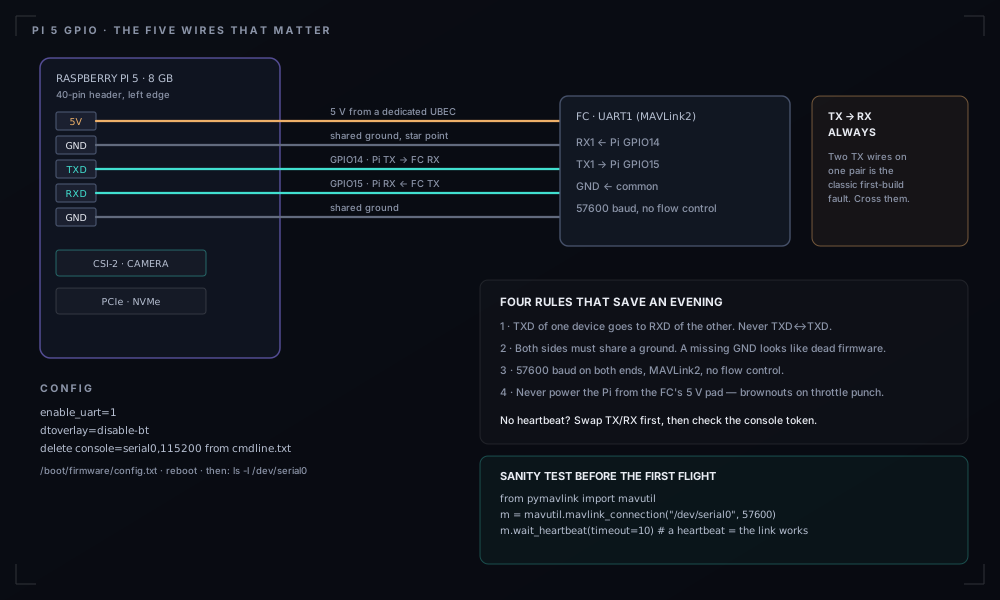
# /boot/firmware/config.txt — enable the primary UART, free it from bluetooth
enable_uart=1
dtoverlay=disable-bt

# /boot/firmware/cmdline.txt — remove this token, or a login console sits on the port
#   console=serial0,115200

sudo reboot
ls -l /dev/serial0        # -> ttyAMA0
# The whole link, tested in four lines. A heartbeat means wiring, baud and protocol are correct.
from pymavlink import mavutil
m = mavutil.mavlink_connection("/dev/serial0", baud=57600)
m.wait_heartbeat(timeout=10)
print("heartbeat from system", m.target_system)No heartbeat? In this order: swap TX/RX (30 seconds), confirm a shared ground, confirm console=serial0 is gone from cmdline.txt, confirm the FC port is MAVLink2 at 57600. That order is deliberate — it is sorted by how often each is the answer.
C3 · Camera
# Camera Module 3 on CSI-0. Test the sensor before writing any inference code.
from picamera2 import Picamera2
import time

cam = Picamera2()
cam.configure(cam.create_still_configuration(main={"size": (2304, 1296)}))
cam.start(); time.sleep(2)
cam.capture_file("test.jpg")          # open it — focus and exposure are set here
cam.stop()
Mount it on silicone or foam, not hard to carbon. Vibration does not blur a single frame visibly — it makes every frame slightly different, which ruins the tracker and therefore the geolocation median.
C4 · Thermal
The Pi 5 throttles around 80–85 °C, and inside a shell with no airflow it gets there in six minutes. Active cooler, a 10 mm intake, and the temperature in your flight log. If the frame rate drops mid-flight, it is almost always this.
D1 · Which model, on which hardware
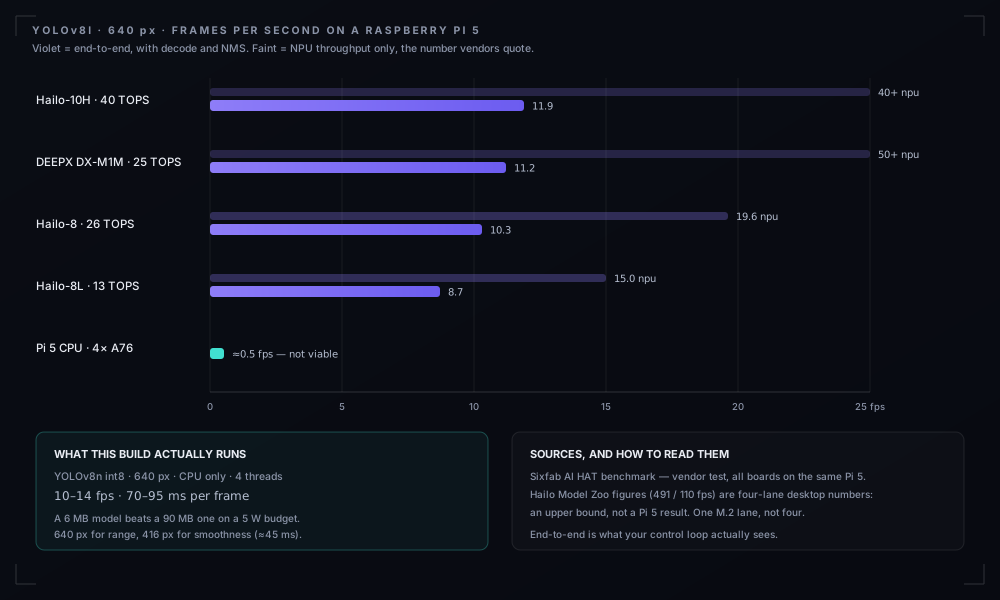
| Model | Size | Where it runs | Use it when |
|---|---|---|---|
| YOLOv8n / YOLO11n | ~6 MB int8 | Pi 5 CPU, 10–14 fps | Default. No accelerator, no driver, no surprises. |
| YOLOv8s | ~22 MB int8 | Hailo-8L / Hailo-8 | Small objects at range, with an AI HAT. |
| YOLO11l | ~50 MB | Hailo-8, ~21 fps NPU | Maximum accuracy on a 26 TOPS HAT. |
| MobileNet-SSD | ~27 MB | Pi 5 CPU, faster but weaker | Coarse classes at short range only. |
| RT-DETR | > 60 MB | Desktop only | Not this aircraft. Listed so you stop asking. |
An accelerator is worth it only once the CPU path works. The Raspberry Pi AI HAT+ (Hailo-8L, 13 TOPS) uses the PCIe lane and turns 12 fps into 60+ on small models — but it adds a driver stack, 15 g and 2–3 W. Build the CPU version first; add the HAT when the model, not the frame rate, is your limit.
D2 · Fine-tune on your own 500 images
A generic COCO detector is bad at exactly the things you care about: a specific vehicle type, a container, an animal, equipment on a site. Five hundred labelled frames from your own camera beat a 500 000-image generic dataset, because the domain matches.
Collect
Fly or hand-hold the camera at the altitudes and angles you will operate at. Vary light: morning, midday, overcast, late afternoon. 500–1500 frames is the useful range.
Label
Roboflow, CVAT or Label Studio. One class per thing you must act on, no more. Export in YOLO format with the train/val/test split applied.
Train
Any GPU, 100 epochs, 640 px. On a free Colab tier this is an evening; on a laptop CPU it is a week — rent the GPU.
Validate on flights, not on frames
Accuracy on held-out video is what matters. A model at 0.85 mAP that flickers between frames is worse than one at 0.75 that holds a track.
pip install ultralytics
yolo detect train data=dataset/data.yaml model=yolo11n.pt epochs=100 imgsz=640 batch=16
yolo detect val   model=runs/detect/train/weights/best.pt data=dataset/data.yaml

# Export twice: ONNX for CPU, int8 for the edge
yolo export model=best.pt format=onnx imgsz=640 simplify=True
yolo export model=best.pt format=onnx imgsz=640 int8=True data=dataset/data.yaml
Quantise deliberately. int8 needs a calibration set of ~300 real frames, not random noise. Export FP32, measure, then int8, measure again. On this Pi the difference is 110–140 ms versus 70–95 ms per frame — enough to change what the aircraft can do.
D3 · The inference loop, complete
Three threads. The capture thread never blocks on inference; the inference thread never blocks on telemetry. Drop-oldest queues keep latency honest.
import queue, threading, time
from picamera2 import Picamera2
from ultralytics import YOLO

frames  = queue.Queue(maxsize=2)   # drop-oldest: latency beats completeness
results = queue.Queue(maxsize=2)

def capture_loop():
    cam = Picamera2()
    cam.configure(cam.create_video_configuration(
        main={"size": (1280, 720), "format": "RGB888"}, buffer_count=4))
    cam.start()
    while True:
        buf = cam.capture_array("main")
        if frames.full():
            try: frames.get_nowait()
            except queue.Empty: pass
        frames.put(buf)

def inference_loop(model):
    while True:
        frame = frames.get()
        r = model.predict(frame, imgsz=640, conf=0.35, verbose=False)[0]
        dets = [{"box": b.xyxy[0].tolist(), "cls": model.names[int(b.cls)],
                 "conf": float(b.conf)} for b in r.boxes]
        if results.full():
            try: results.get_nowait()
            except queue.Empty: pass
        results.put((time.time(), frame, dets))

threading.Thread(target=capture_loop, daemon=True).start()
model = YOLO("models/recon_int8.pt")
threading.Thread(target=inference_loop, args=(model,), daemon=True).start()
Tracking, so the output stops flickering
def iou(a, b):
    ax2, ay2 = a[0]+a[2], a[1]+a[3]
    bx2, by2 = b[0]+b[2], b[1]+b[3]
    ix = max(0, min(ax2,bx2) - max(a[0],b[0]))
    iy = max(0, min(ay2,by2) - max(a[1],b[1]))
    inter = ix*iy
    return inter / (a[2]*a[3] + b[2]*b[3] - inter + 1e-9)

class Tracker:
    def __init__(self, iou_thr=0.3, max_age=5):
        self.tracks, self.iou_thr, self.max_age, self._id = {}, iou_thr, max_age, 0

    def update(self, dets, t):
        for tr in self.tracks.values(): tr["age"] += 1
        for d in dets:
            w, h = d["box"][2]-d["box"][0], d["box"][3]-d["box"][1]
            box = (d["box"][0], d["box"][1], w, h)
            best, score = None, self.iou_thr
            for tid, tr in self.tracks.items():
                if tr["label"] != d["cls"]: continue
                s = iou(tr["box"], box)
                if s > score: best, score = tid, s
            if best is None:
                self._id += 1; best = self._id
                self.tracks[best] = {"label": d["cls"], "box": box, "age": 0, "first": t}
            self.tracks[best].update(box=box, age=0, last=t, conf=d["conf"])
        for tid in [k for k, v in self.tracks.items() if v["age"] > self.max_age]:
            del self.tracks[tid]
        return self.tracks
Pixel to coordinate
Bearing from the camera intrinsics, ray rotated into the world frame by attitude, intersected with the ground plane at altitude above ground.
import numpy as np

def pixel_to_world(u, v, intr, R_body, R_cam, alt_m):
    """u,v = bottom-centre of the box (the ground contact point).
       R_body = body->ENU rotation from the autopilot. alt_m = AGL, not MSL."""
    ray_c = np.array([(u - intr["cx"]) / intr["fx"],
                      (v - intr["cy"]) / intr["fy"], 1.0])
    ray_w = R_body @ (R_cam @ ray_c)
    ray_w /= np.linalg.norm(ray_w)
    if ray_w[2] >= -1e-6: return None      # horizon: no intersection
    t = -alt_m / ray_w[2]
    if t < 0 or t > 500: return None
    return (t * ray_w)[0], (t * ray_w)[1]   # east, north

def to_latlon(east, north, lat0, lon0):
    R = 6378137.0
    return (lat0 + np.degrees(north / R),
            lon0 + np.degrees(east / (R * np.cos(np.radians(lat0)))))
Four things decide whether this is accurate to 3 m or 30: use the bottom-centre of the box, use AGL rather than MSL altitude, calibrate the intrinsics with a checkerboard, and take the median of the last ten estimates weighted by confidence.
D4 · Run it as a service
# /etc/systemd/system/recon.service
[Unit]
Description=Recon perception service
After=network-online.target

[Service]
ExecStart=/home/pi/recon/bin/python /opt/recon/main.py
WorkingDirectory=/opt/recon
Restart=always
RestartSec=3
User=pi

[Install]
WantedBy=multi-user.target
sudo systemctl daemon-reload && sudo systemctl enable --now recon
journalctl -u recon -f # watch detections live over SSHE1 · Seven flights, in this order
Hover, 30 seconds, no payload
1 m altitude, no wind. Confirm it holds attitude and lands cleanly. Check logs for vibration clipping.
Hover with the Pi running
Same again, inference on. Watch current draw and the Pi's voltage. Brownouts appear here.
Position hold
Wind compensation and compass health. If it circles, you have interference — land and fix the mast.
GUIDED mode, no movement
Let the Pi send a hold command. Nothing should move. This proves the MAVLink link is correct in one direction.
Pi-commanded small translation
Two metres, and back. An RC hand on the mode switch the entire time.
Detection at 20 m
One known object, one altitude, measure the distance between the reported coordinate and the surveyed one.
Detection at operating altitude
Repeat at 40–50 m. Expect the error to grow; record it, because that number is your mission's real resolution.
E2 · Legal and ethical constraints
A drone that recognises people is a surveillance system, and is regulated as one. In the EU: EASA open category, under 120 m, visual line of sight, operator registration if it carries a camera, no flying over people or near airports. Beyond visual line of sight needs an authorisation you probably do not have. Under GDPR, footage of identifiable people is personal data — if it lands on a server you operate, you are a data controller.
- Fly on private land with permission, with a spotter.
- Do not run person detection on the public. Detect what you have a legitimate purpose for.
- Keep pixels on the aircraft, with a retention period you can defend.
- Log every flight — area, purpose, duration. An answer beats a shrug.
E3 · Bill of materials
| Item | Spec | Weight | ≈ € |
|---|---|---|---|
| Frame | 5", 220 mm, 5 mm arms | 120 g | 55 |
| Motors ×4 | 2207 · 1960KV | 132 g | 80 |
| ESC | 4-in-1 · 45 A | 14 g | 55 |
| Flight controller | H743 · 7 UARTs | 10 g | 65 |
| Props | 5.1×4.6×3 | 24 g | 6 |
| ELRS RX | 2.4 GHz | 3 g | 20 |
| GPS + compass | M10 | 13 g | 30 |
| VTX + antenna | 5.8 GHz 800 mW | 22 g | 35 |
| Pi 5 | 8 GB + cooler + NVMe | 87 g | 135 |
| Camera Module 3 | IMX708 · 84° | 8 g | 35 |
| UBEC | 5 V / 5 A | 12 g | 12 |
| 4G modem | USB + antennas | 38 g | 45 |
| Battery | 6S 1500 mAh | 265 g | 45 |
| Misc | wire, mounts, XT60 | 55 g | 25 |
Roughly €640 plus a charger and a radio. The best quality-of-life upgrade is a better charger; the second is a spare set of arms.
E4 · What broke on mine
- Thermal throttling at 6 minutes — closed canopy, no airflow, frame rate fell to 4 fps. Active cooler + intake hole.
- Compass interference — position hold wandered; GPS mast raised 40 mm and the NVMe cable rerouted.
- CSI ribbon cracked at the connector after a hard landing. Silicone the connector, strain-relieve the ribbon, carry a spare.
- Brownouts on throttle punch until the dedicated UBEC went in.
- One motor destroyed by a 10 mm screw. See A2. It cost €20 and an evening.